The capture agent

The work between printing and filing.

Your tax software already produces everything: the return, the e-file authorization, the organizer, the fee file. What costs your firm hours is what happens next — someone naming it, someone filing it, someone stuffing an envelope.

A small desktop agent watches the folders those things print into, and takes that step off the firm. It needs nothing from your tax vendor, because it works on folders rather than on an API.

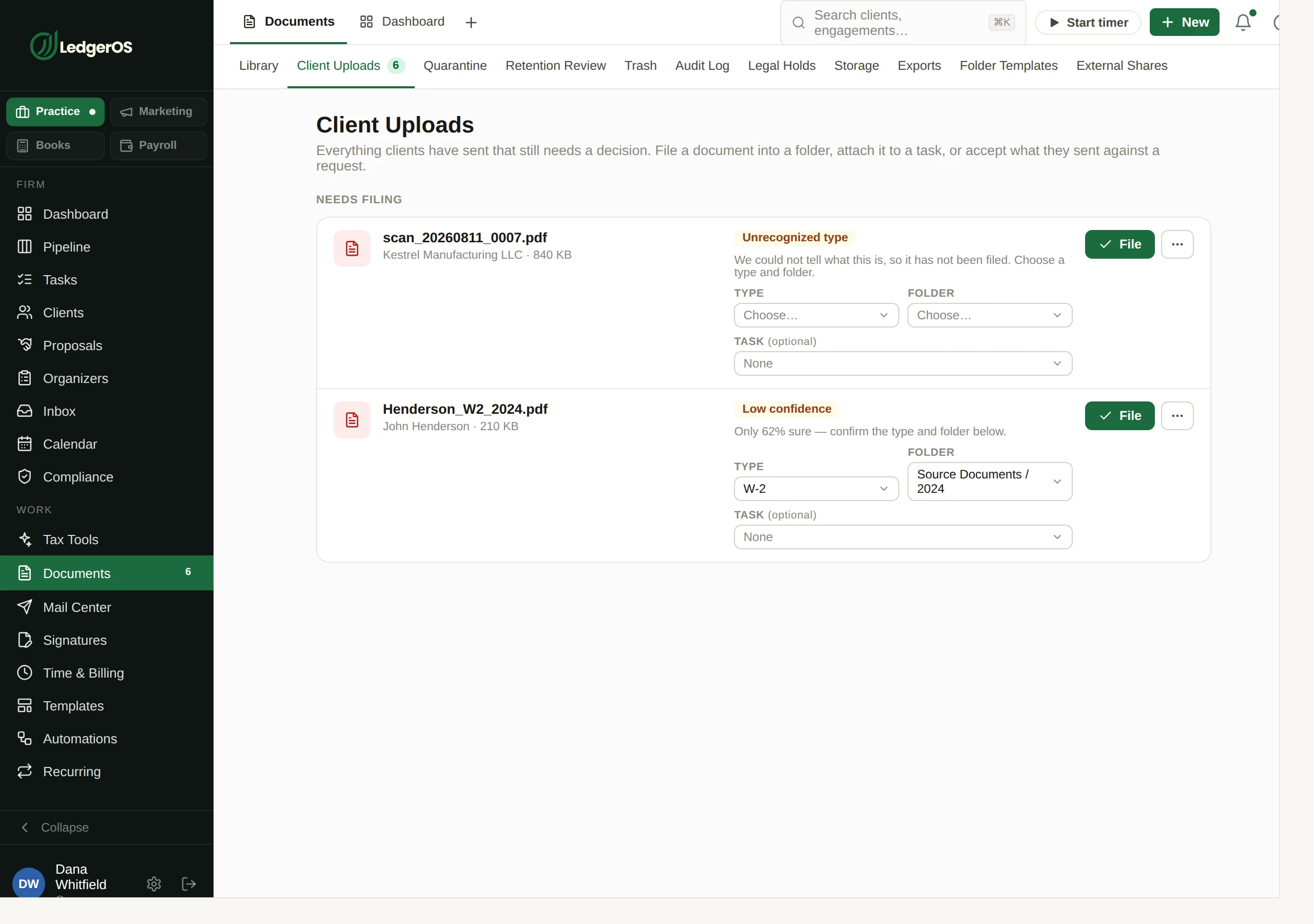
The LedgerOS document library, listing filed client documents with their year, type and version.

One agent, four kinds of folder

A watched folder is given a purpose when you set it up, and that purpose decides what happens to everything that lands in it. Each lane has its own safeguards, and each one says who signs off on it.

Documents

Returns and authorizations file themselves

The default lane. Anything that appears under a watched root is hashed, matched to a client by its folder path, and filed against your folder rules — the same path a portal upload takes, so there is one filing pipeline rather than three.

  • Identity is the folder path: the agent walks up to the nearest mapped client folder, then reads the structure below it against your subfolder rules
  • Year tokens are understood, so "Tax/2026" files to the right year
  • Exact-bytes dedup per client, so the same export captured twice does not become two documents
  • Same client, same path, same filename and new bytes becomes the next version rather than a second document
  • A document whose prior version is already signed or sent will not be silently superseded — it is held for review
Who decides

Nobody. This lane runs unattended, which is the whole point of it.
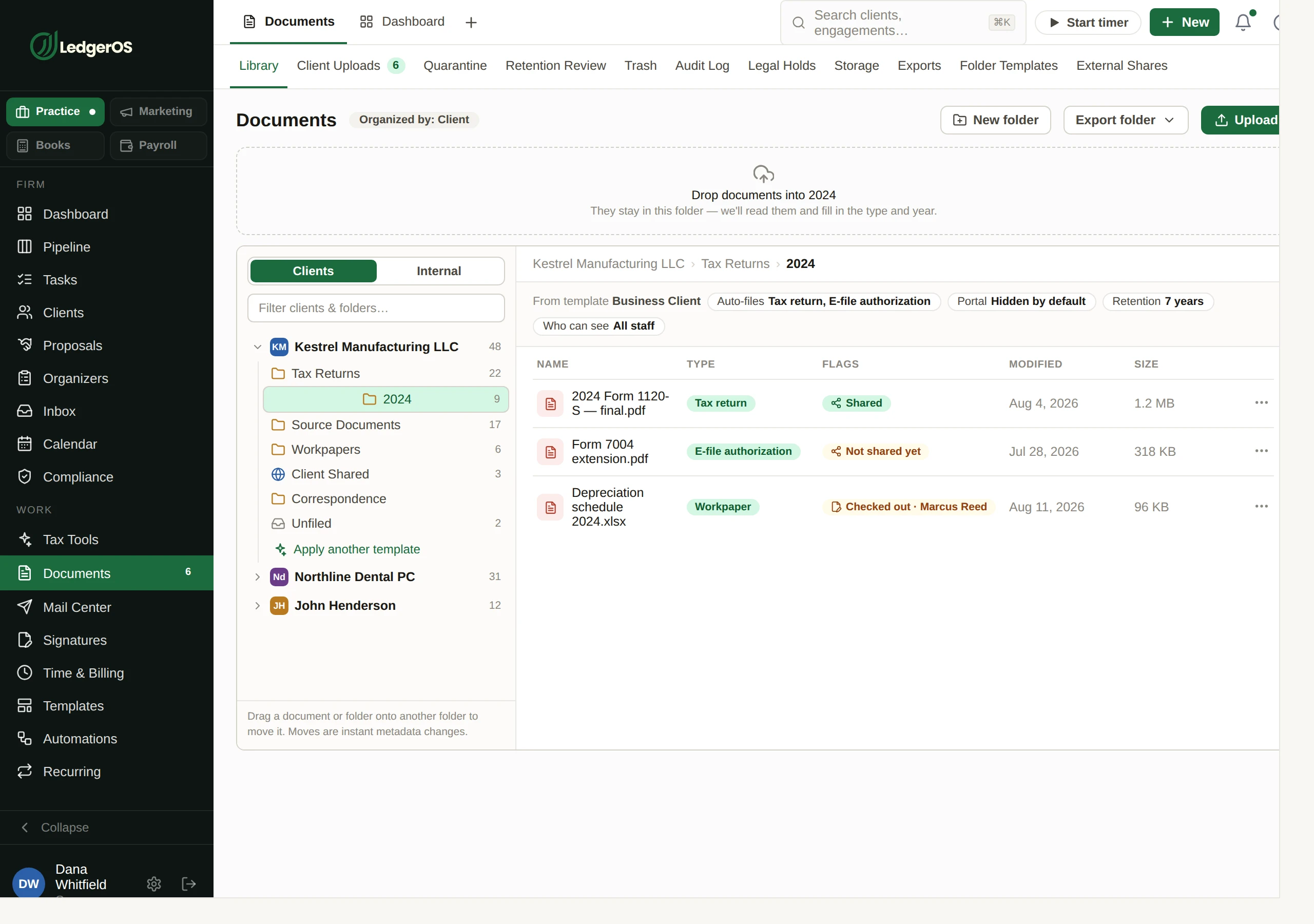
The LedgerOS document library, listing filed client documents with their year, type and version.
When it cannot tell

An unmatched document is a queue, not a guess

If the path does not resolve to a mapped client folder, the document goes to a staging lane instead of being filed somewhere plausible. In the background it is read for a TIN or a name and a suggested client is attached — as a suggestion, on a row a person confirms.

  • Staging is idempotent on content hash, so a retry does not pile up duplicates
  • The suggestion never blocks the capture and never files anything on its own
  • Low-confidence and timed-out scans say which of those they were, rather than sharing one “needs review”
Who decides

A person accepts the match. The agent proposes; it does not decide who a document belongs to.

The capture staging lane in LedgerOS, where a document the agent could not match to a client waits with a suggested match.
Paper organizers

Print a batch of organizers, and they mail themselves

Point a watched folder at where your tax software prints organizers, arm a capture window, and print the run. Each PDF is picked up, matched to a client, priced and assembled into a mail batch — addresses validated, sheet counts resolved, spot checks applied.

  • The lane only accepts while a capture window is armed, so a stray reprint in June cannot mail itself
  • PDFs only; lock files and partial downloads are dropped rather than retried forever
  • Client identity comes from the full source path, not just the parent folder name — which is what lets an organizers source and a documents source share one root
  • Name-match strictness, spot-check requirements, unmatched handling and a cost cap are firm settings, applied before anything is priced
Who decides

You approve the batch. Approval freezes it, prices it and dispatches it — the code calls that the point of no return, and a batch with a blocking mismatch will not pass it.

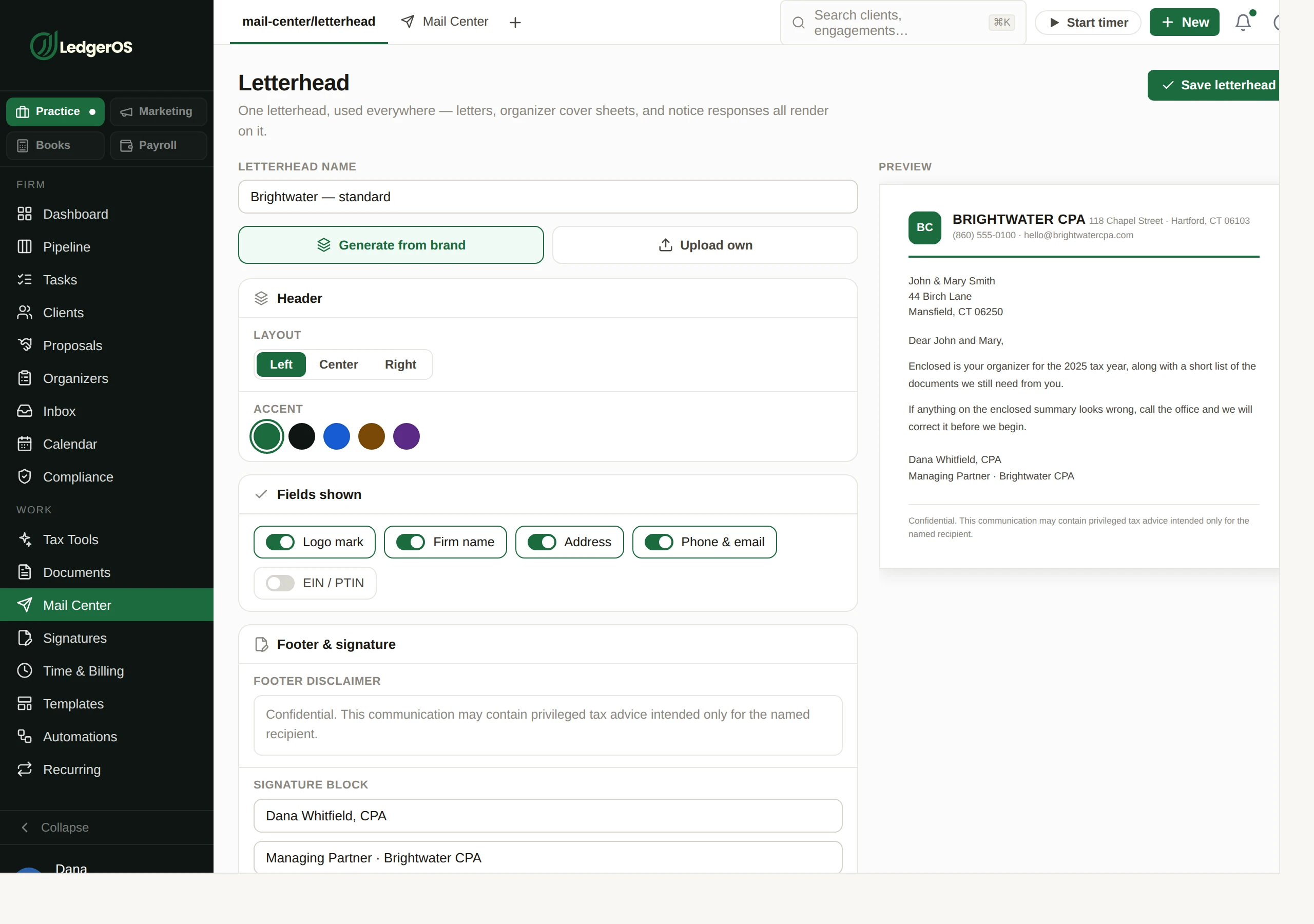
Designing a firm letterhead in LedgerOS, used on letters and physical mail.
E-signature sets

Printed 8879 packets, captured and sent

Point a folder at where signature sets print. Each packet is deduped, resolved to a client from its path, and classified page by page against the set template — which form is on each page, and how confident the model is about it. The queue then shows exactly what a send would produce.

  • Signers resolve from the client’s contacts, never from names read off the PDF
  • A spouse is included only on a joint return; otherwise the spouse fields drop from every form in the packet
  • The set is merged into one PDF in roster order, so each person verifies identity once and signs the whole packet rather than once per form
  • The queue shows how many signers will need KBA before you send — derived by the same resolver the send itself uses, so the preview cannot drift from the bill
  • A signer is exempt from KBA only where the return was in person and the client was verified in a prior year — the Publication 1345 conjunction, not either half of it
Who decides

Auto-send exists, is off by default, and only fires when everything is unambiguous — see below. Anything else waits in the queue.

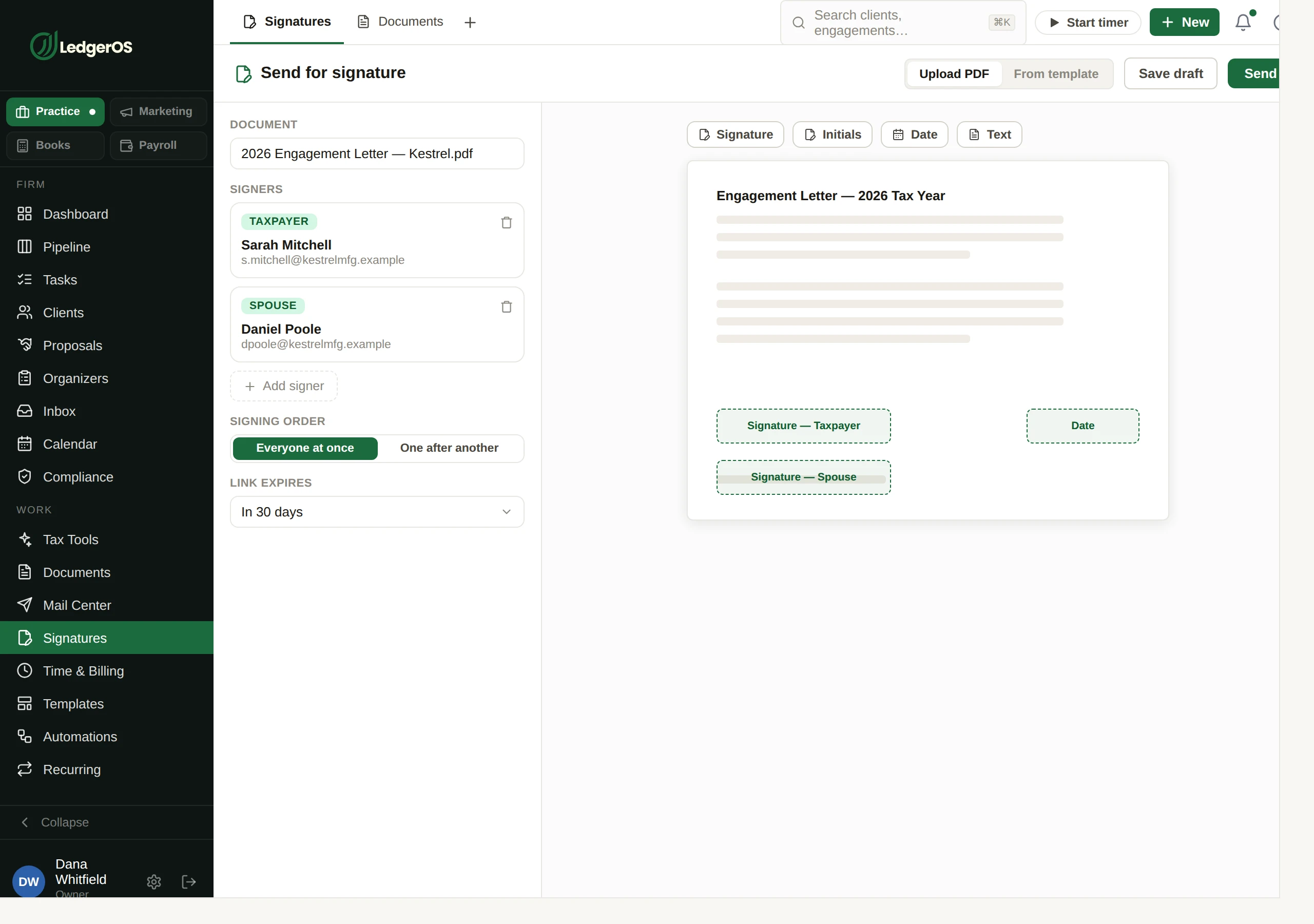
Preparing a document for e-signature in LedgerOS, with signature and date fields placed on the page.
Fee imports

Fee files staged, never billed

A watched folder can take the fee export your tax software produces — CSV or Excel — and stage it as an invoice import batch against the format you mapped once.

  • Excel owner-lock files and partial downloads are dropped rather than treated as exports
  • The staged batch reuses the same invoice numbering, ledger posting and delivery rules as a manually created invoice
Who decides

Fail-closed: nothing bills until a person approves the batch.

When a signature packet sends itself

This is the part worth reading carefully, because it is the one a firm needs to trust in February. A captured set sends without anyone touching it only when every one of these is true:

  • The set template has auto-send explicitly enabled — it is off by default
  • The capture matched a client at auto-assign grade, at or above that match’s confidence floor
  • A folder match is deterministic and clears the floor by definition; a name match must earn it
  • There is no client conflict on the capture
  • The watched source is active rather than paused
  • The client is not individually opted out of auto-send

And when it does not send, it says why

Every auto-send decision is recorded with the reason it went the way it did — the match tier, the confidence, the floor it had to clear, whether the template was opted in, whether the source was paused, whether the client was opted out. “Why didn’t it send?” is a question with an answer, which is not something you can say about most automation.

What it is, and what it can reach

It is a small program on one machine in your office — usually the one your tax software already runs on — and it only ever pushes outward.

Paired with a token you can revoke
The credential is never stored as issued — it is hashed, and looked up by hash. Revoking it stops the agent on its next call, and there is nothing in the database to leak back.
It asks; nothing reaches in
The agent polls for its configuration and pushes what it finds. Nothing opens a port, and nothing connects inbound to your network.
You choose what it can see
Per source: the root folder, a filename filter, an allow-list of file types, and a start date so it does not sweep up a decade of history on day one. Any source can be paused, and a rescan requested.
You can tell whether it is running
Every call stamps the credential, and the connected indicator reads that stamp rather than inferring liveness from the last document that happened to arrive. A quiet folder and a dead agent do not look alike.

Ready to retire the stack?

One plan for the whole practice — $129 per seat, every Practice module included. Start your free trial today; migration support from your current tools comes standard.

14-day free trial · No credit card required · Cancel anytime