All 18 modules
Firm

Pipeline

Tax prep, bookkeeping and advisory do not move through the same steps, so here they do not share a board. Each kind of work gets its own, with columns you name — and the column a job sits in is what tells everyone else, including the client, what happens next.

The LedgerOS pipeline board: engagements in Not started, In progress, Waiting on client and In review columns, each card showing the client, the work, its owner and its due date.

What it does

  • A board per kind of work, with the stages your firm actually uses
  • Seven status roles behind your names, so the rest of the platform knows what a column means
  • A separate, plainer label your clients see — rename a column in March and their view never moves
  • Filters that tell you what they are hiding, so nobody works from a board missing half the season
  • Stop work skipping stages, and hold a job until its subtasks are done

How it works

Call the column whatever your firm calls it

Every status you make sits on one of seven roles, and the role is what the rest of the platform reads. Name a column “Chasing paperwork” and mark it as waiting on the client, and the automations, the reports and the client portal all carry on working. You are not learning our vocabulary — we are learning yours.

  • Rename, recolor and reorder statuses whenever the firm’s vocabulary changes
  • Automations fire on the role, so renaming a column in March breaks nothing
  • Reports group by role, so two firms with different words get comparable numbers
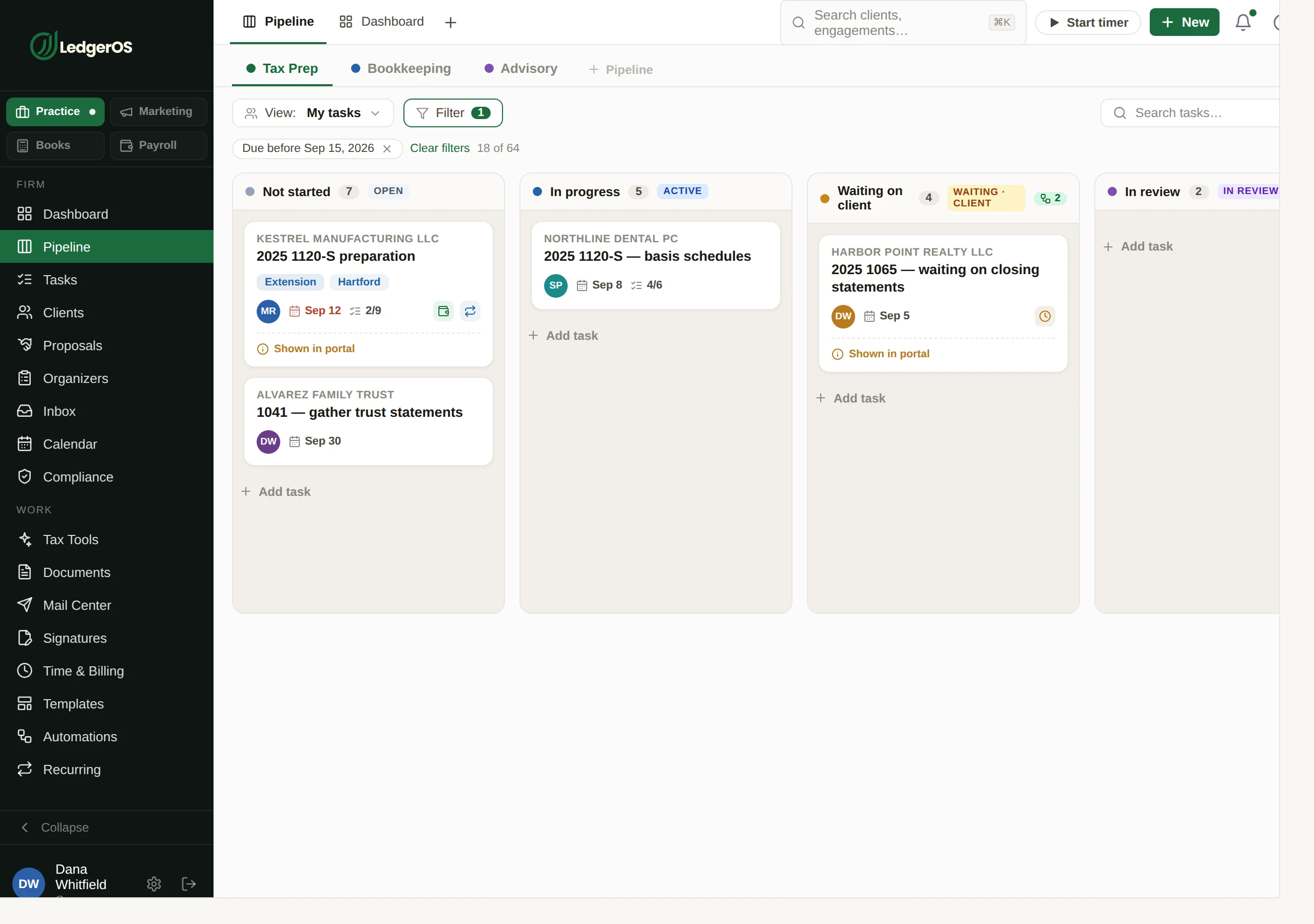
The LedgerOS pipeline board: engagements in Not started, In progress, Waiting on client and In review columns, each card showing the client, the work, its owner and its due date.

Your words inside. Their words outside.

Every column has a second, plainer label that is the only thing the client sees, with a line explaining what is happening. Your shorthand stays yours. Rename something in the middle of March and nothing moves on their side.

As loose or as strict as your firm needs

Some firms want anyone to drag anything anywhere. Some want work to move forward only, in order, with nothing skipped. Both are a setting. So is whether a job advances itself when the last subtask is ticked, and whether it can be finished while any are still open.

A filtered board never looks like a quiet one

Every filter shows as a chip with a count of what it is hiding. It matters more than it sounds: a board with nothing on it and a board hiding forty things look identical, and they call for completely opposite reactions in the last week of March.

Two minutes inside Pipeline

Questions

How many pipelines can we have?
As many as your firm runs kinds of work. Most start with tax prep, bookkeeping and advisory and add from there.
What happens to automations if I rename a status?
Nothing. They are keyed to the status role, not its label, which is exactly why roles exist.

Next: TasksEvery job in the firm, attached to the client it belongs to.

Read on →

Ready to retire the stack?

One plan for the whole practice — $129 per seat, every Practice module included. Start your free trial today; migration support from your current tools comes standard.

14-day free trial · No credit card required · Cancel anytime